
Cloud sandboxes are clean. They also cannot touch your logged-in CRM, your local Excel exports, or the browser session where vendor docs actually work.
Moonshot's answer is Kimi Work, a desktop agent for Mac and Windows that reads local files, drives your real browser, and can launch up to 300 sub-agents on a single instruction.
The AlphaSignal digest framed it as parallel AI workers on your machine. That is directionally right, with pricing and tier gates attached.
What Kimi Work actually bundles
Kimi Work merges pieces Moonshot already shipped separately:
| Piece | Role |
|---|---|
| Kimi web reasoning | Long documents, multi-step plans |
| Kimi WebBridge | Browser automation on real sessions |
| Kimi Code | File and command execution locally |
| Agent Swarm | Parallel sub-agent orchestration |
Outputs are not limited to chat text. Moonshot markets finished PDFs, PowerPoint decks, Excel files, code repos, and interactive reports from one desktop run.
Decrypt's launch coverage emphasized the local-first design: your laptop must stay awake. Cloud product Kimi Claw still wins for 24/7 jobs when the machine is off.
Agent Swarm architecture
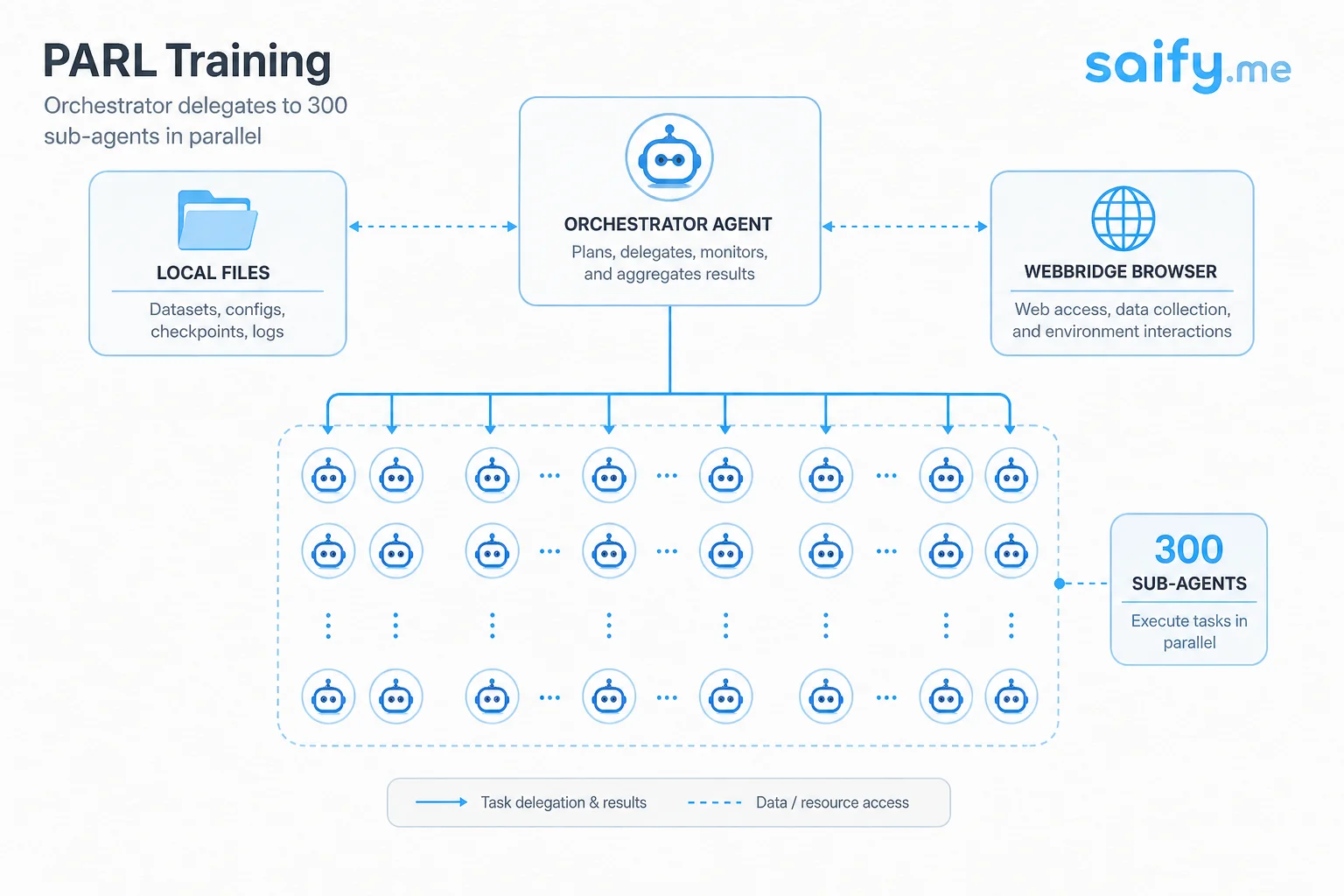
Agent Swarm is Moonshot's horizontal scaling pattern for agents. No hand-crafted role graph. A top orchestrator decomposes work and fans out parallel sub-tasks.
Scale claims from Moonshot docs (verify on your workloads):
| Metric | Claimed capability |
|---|---|
| Sub-agents | Up to 300 parallel |
| Tool steps | 4,000+ coordinated per task |
| Speed vs single agent | ~4.5× on large search scenarios |
| Critical path reduction | 3× to 4.5× fewer critical steps (PARL training) |
Training uses PARL (Parallel-Agent Reinforcement Learning). The orchestrator learns delegation, not a fixed map of "researcher" and "writer" bots.
Kimi K2.6 brought the 300-agent ceiling. Kimi K3 later shipped a K3 Swarm Max variant on the stronger base model. Same swarm shape, smarter sub-agents individually.
Local files and real browser sessions
Two features separate Kimi Work from typical cloud agents:
- Local file access without uploading everything to a vendor bucket first.
- WebBridge browser control on sessions that already have cookies and SSO.
For finance and research workflows Moonshot highlights A-share, Hong Kong, and US market data integrations plus scheduled cron-style background jobs.
That is the use case cloud sandboxes struggle with: authenticated market terminals, internal wikis, and desktop-only exports.
Pricing tiers and swarm limits
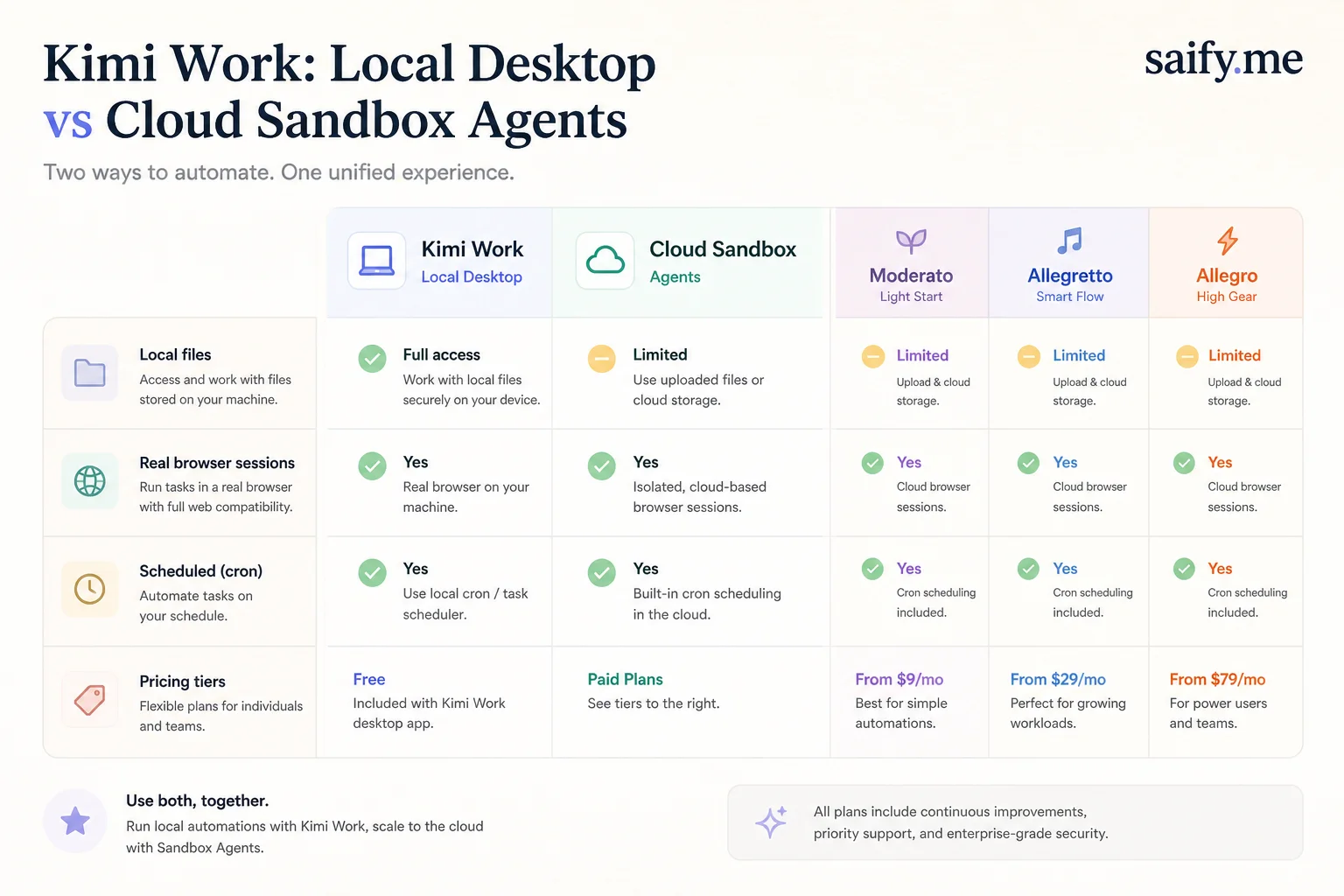
Kimi Work downloads are free. Meaningful swarm usage requires paid plans:
| Tier | Approx. price | Swarm access |
|---|---|---|
| Moderato | ~$19/month | K2.6/K3, Deep Research, Kimi Code |
| Allegretto | ~$39/month | Limited Agent Swarm |
| Allegro | ~$99/month | Full 300-agent swarm |
| Vivace | ~$199/month | Highest volume professional tier |
Agent Swarm tasks burn more credits than standard agent runs. Budget for parallel search jobs accordingly.
When I would use this versus cloud agents
Kimi Work fits when:
- Source data lives on disk or behind a desktop browser login
- You want parallel web research with structured tables as output
- Latency to a cloud sandbox upload path is unacceptable
Cloud agents still win when:
- You need 24/7 scheduled jobs without a laptop online
- Compliance requires a locked-down remote environment
- You already standardized on Cursor, Codex, or Claude Code in CI
I route client production coding through harnesses with repo sandboxes and PR gates, not desktop swarms. Kimi Work is interesting for personal knowledge work and pilot research where local access is the bottleneck.
Read alongside Kimi K2.7 Code in agent loops if you care about the model under the swarm, not just the orchestration chrome.
Risks I would not ignore
- Machine dependency. Closed laptop equals stopped jobs.
- Parallel cost spikes. 300 agents is a credit firehose if the orchestrator over-fans.
- Desktop security surface. Local file plus browser control is powerful and risky on a shared machine.
- Beta stability. Launch coverage noted internal testing phases. Expect UI and policy shifts.
Moonshot's swarm story is one of the clearest public pushes toward parallel agent org charts designed by the model, not by a human workflow diagram.
If you are evaluating desktop versus cloud agents for a research or ops team, book a free discovery call and we can map task shapes to the right harness.