
Mac users had computer use for weeks. Windows developers finally got parity on May 29, 2026, and the gap mattered more than the tweet count suggests.
OpenAI's Computer Use docs now cover both platforms. Codex can see your screen, move the cursor, and type through graphical flows the same way a human would. That is a different product category than "suggest a patch." It is closer to a junior QA engineer sitting at your desk.
I ship agents for clients who still run Windows build machines. This post is how I think about the feature after reading the rollout notes, the privacy constraints, and the mobile steering loop.
What computer use actually does
Computer use closes the gap between code edits and visual verification.
Most coding agents live in the terminal and the file tree. They are great at refactors, grep, and test output. They struggle when the bug only appears after you click through an installer, toggle a setting panel, or load a checkout page in a real browser session.
PCWorld's coverage
describes the mechanism plainly: Codex uses a virtual mouse and keyboard to navigate Windows apps. You trigger it with @Computer or an app-specific mention like @Chrome or @Paint.
| Surface | What Codex can touch |
|---|---|
| Native Windows apps | Settings panels, installers, desktop tools with no API |
| Browsers | Live checkout flows, onboarding screens, visual regressions |
| Data sources without plugins | Legacy CRM screens, internal admin UIs |
| Bug reproduction | GUI-only failures that never show up in stderr |
OpenAI's own example is the right mental model: open @Chrome and verify the checkout page still works after the latest changes. That is a task I would otherwise assign to a human before a release.
The Windows constraint nobody should skip
Here is the part that changes how you schedule work.
On macOS, computer use can operate with more background flexibility once you grant Screen Recording and Accessibility permissions. On Windows, it is foreground-only. Codex takes over the active desktop. You cannot keep working in the same session while it clicks through your app.
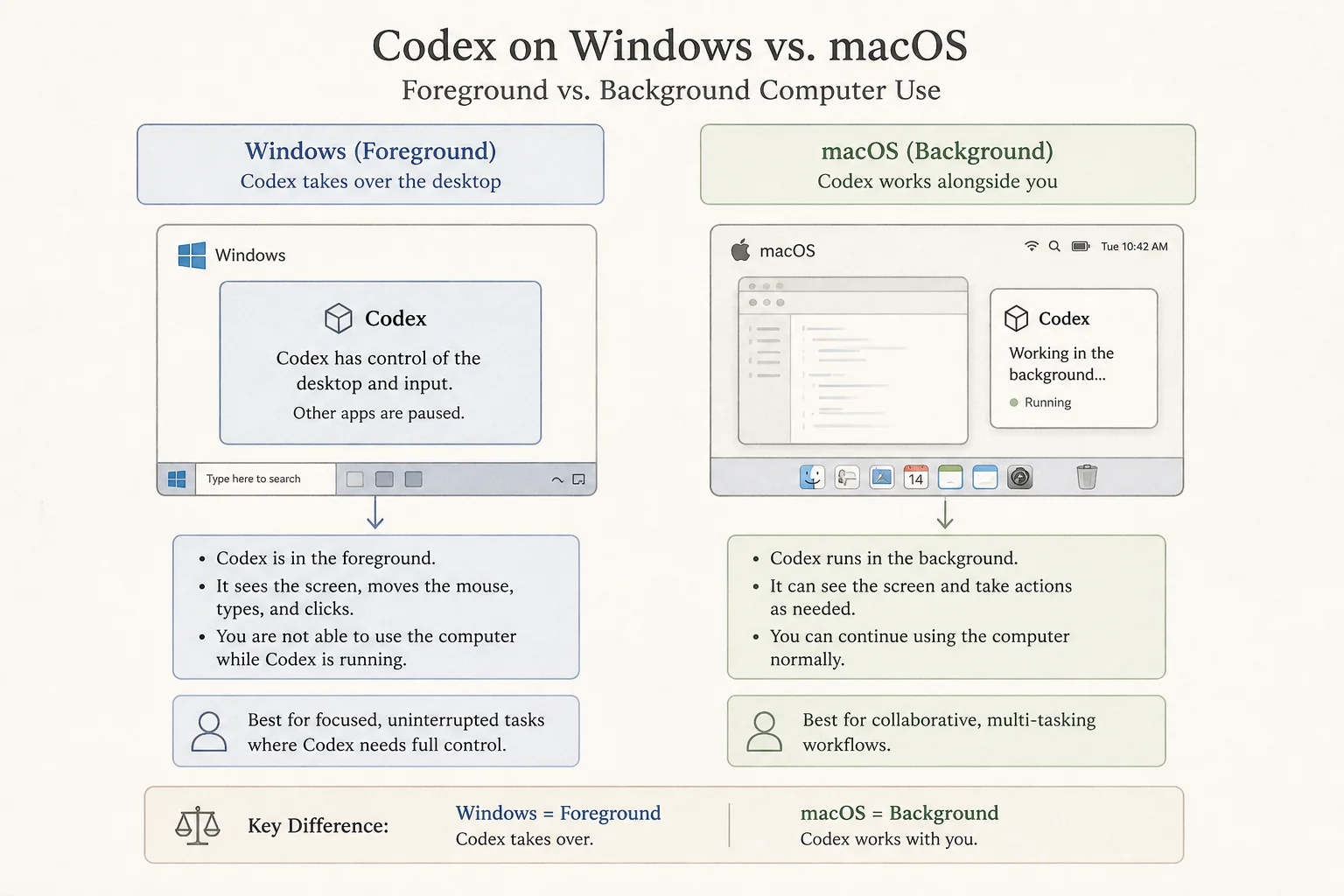
That is not a minor UX detail. It is an ops constraint.
If you plan to run computer use on your daily driver laptop during business hours, you will fight for the keyboard. The practical patterns I would use instead:
- Dedicated QA machine left unlocked on your desk while Codex runs visual checks
- Windows VM on a host you are not actively using
- After-hours batch where foreground takeover is acceptable
- Remote steering from your phone while the PC does the clicking
TechTimes also flags a regional gap: computer use is not available in the EEA, UK, or Switzerland at launch. If you are building for those users, plan a fallback QA path.
Mobile steering changes the workflow
The May 29 release paired Windows computer use with Codex support in the ChatGPT mobile app.
That combination is more interesting than "control your PC from the couch."
A developer can start a visual QA task on a Windows box, walk to a meeting, and steer from iOS or Android. The phone sends prompts, approvals, and follow-ups. The Windows machine supplies project files, shell access, MCP servers, browser tabs, and the desktop surface computer use needs.
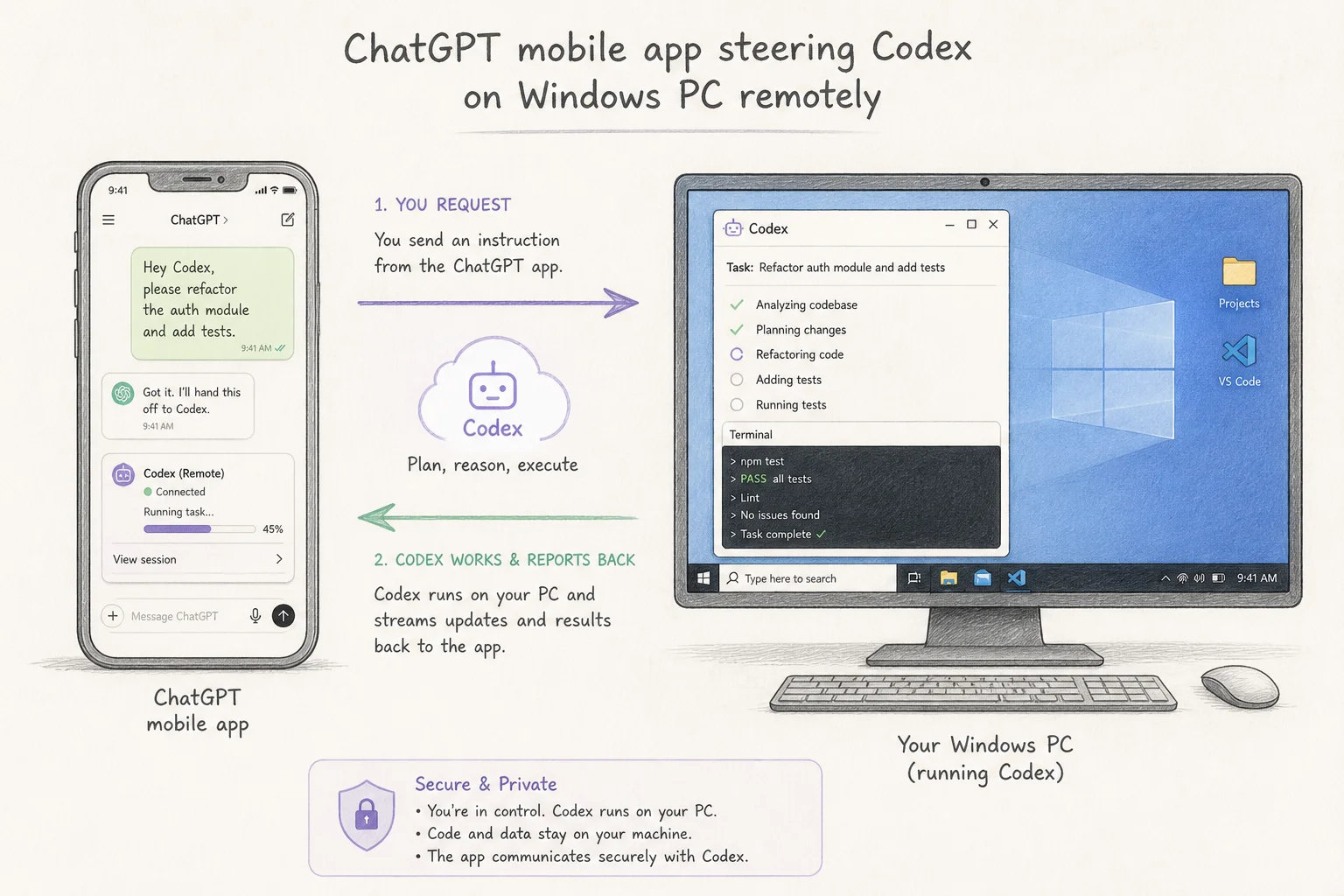
Setup is straightforward in OpenAI's walkthrough: enable the connection in Codex settings, scan the QR code in ChatGPT mobile, and your Windows device appears in the remote list. The machine must stay on, unlocked, and online.
For teams already running long agent loops, this is the missing supervision layer. You do not need to babysit the foreground session. You need a phone in your pocket to approve edge cases.
How I would use it in a real shipping loop
Computer use is not a replacement for structured tests. It is a supplement for the messy middle where APIs do not exist and Playwright coverage would cost more than the feature.
| Stage | Tool | Why |
|---|---|---|
| Unit + integration tests | CI on every PR | Fast, deterministic, cheap |
| API-level E2E | Playwright / Cypress where URLs are stable | Repeatable, headless-friendly |
| GUI-only flows | Codex computer use | Installer wizards, legacy admin panels, one-off visual checks |
| Production deploy | Human sign-off on high-risk paths | Agents still miss edge cases |
A concrete client scenario: a Windows desktop app with a licensing screen that only breaks on certain DPI settings. Writing a full UI automation harness might take a day. Pointing Codex at @AppName with a reproduction script might take twenty minutes of prompt iteration.
The win is speed on low-volume, high-friction visual tasks. The risk is treating it like a free regression suite.
Privacy and security notes
Computer use sends screen contents through OpenAI's servers. That is explicit in the rollout coverage and it should shape what you point the agent at.
I would not run computer use on a machine with:
- Unmasked customer PII on screen
- Production database admin panels with live credentials visible
- Financial or health records in active windows
Treat the desktop like a shared screen in a support call. Close sensitive tabs first. Use a sandbox VM when the task touches staging data that still looks real.
OpenAI notes that computer use is available on all Codex plans at launch, including Free and Go tiers, with paid tiers expected later. That lowers the barrier to experiment, but it also means more people will try it on their primary laptop without reading the foreground and privacy constraints.
Computer use vs Codex for Chrome
OpenAI's demo video makes an important distinction. If the task lives entirely in the browser, Codex for Chrome can work across multiple tabs in the background. Computer use is the right tool when the flow crosses native apps, settings panels, or anything outside a single browser surface.
| Task | Prefer |
|---|---|
| Multi-tab web QA | Codex for Chrome |
| Native Windows app | Computer use |
| Installer + browser handoff | Computer use |
| Headless CI regression | Structured browser tests |
Do not default to computer use because it feels more agentic. Default to the narrowest tool that can finish the job without taking your screen.
What this means for the coding assistant era
The Alpha Signal framing is blunt and mostly right: agents are moving from suggestion to operation. Computer use on Windows is the parity play that lets a huge slice of developers actually try that shift without buying a Mac.
For applied AI work, the interesting question is not whether Codex can click buttons. It is whether your team has a safe slot in the release process for foreground desktop agents: which flows are worth the privacy trade, which machine runs them, and who steers from mobile when the agent gets stuck.
If you are wiring agentic QA into a Windows shop and want a second pair of eyes on the workflow, book a free discovery call. I have shipped enough "demo agent" loops to know where the production guardrails actually matter.