
Your front desk is on WhatsApp whether you planned it or not. Leads ask prices at 10pm. Regulars want to reschedule mid-shift. Someone DMs a photo of a broken part and expects a quote before lunch.
If that inbox is still a person with a green badge and a good memory, you are leaking bookings. The fix is not "more staff on chat." It is picking the right WhatsApp product, then wiring bots, CRM, and reminders so humans only handle the weird stuff.
I am the engineer who usually does that wiring: WhatsApp Cloud API into GoHighLevel or HubSpot, optional voice when a call still converts better than text, and the boring compliance that keeps Meta from throttling your number.
Business App vs API (pick before you buy a bot)
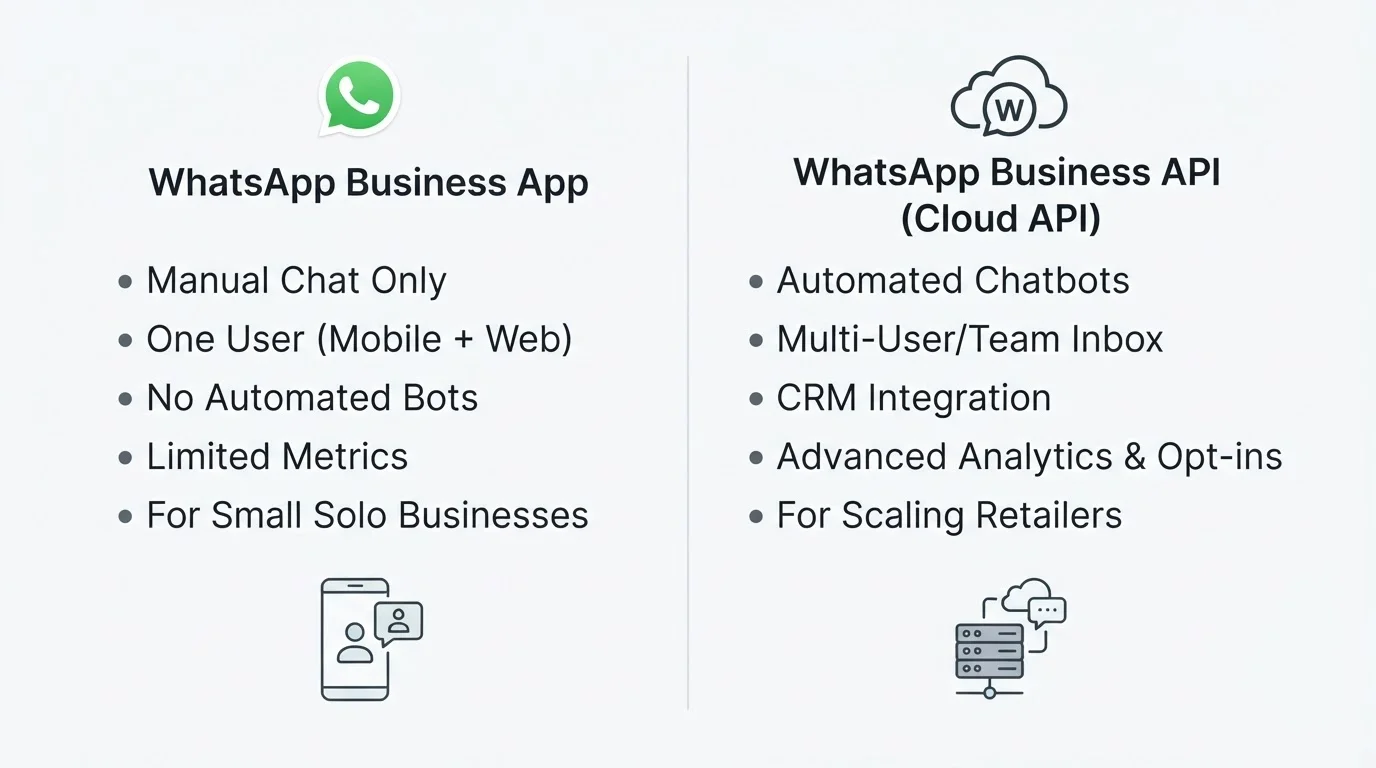
Direct answer: the free WhatsApp Business app is fine for a solo operator with light volume. Real automation (AI replies, calendar booking, CRM sync, triggered reminders) only exists on the WhatsApp Business Platform, usually via the WhatsApp Cloud API.
| WhatsApp Business app | WhatsApp Business API (Cloud API) | |
|---|---|---|
| Who it fits | One person, low volume, manual chat | Teams, after-hours leads, multi-channel ops |
| AI bots | No | Yes |
| CRM / workflow sync | No real integrations | Webhooks into your stack |
| Multi-user inbox | Limited | Built for software + agents |
| Templates outside 24h | Basic labels / away messages | Approved utility, marketing, auth templates |
| Phone number | Stays in the app | Dedicated API number (plan the cutover) |
Meta's own docs are blunt about the split: Cloud API is how you send and receive messages programmatically. If a vendor demos a "WhatsApp bot" on the free Business app alone, ask where the webhooks live. There usually aren't any.
What to automate first (qualify, book, remind)
Don't start with a marketing blast. Start with the messages that already cost you money when a human is slow.
1. Qualify and book
A useful bot answers the top twenty questions from your real chat history, then pushes toward a booking or a handoff. For a clinic that might be hours, insurance, and next free slot. For a contractor: service area, rough price band, and a site-visit calendar.
Wire availability to a live calendar, not a static "we'll call you." The bot should:
- Greet and confirm intent in the customer's language when you can (English plus one local language is common; in mixed markets I also see Core5-style pairs show up in the same inbox).
- Ask two or three qualifying questions, not a twenty-field form.
- Offer concrete slots or create a CRM lead with a clear next step.
- Escalate to a human when confidence drops or the customer asks for one.
2. Sync every conversation to the CRM
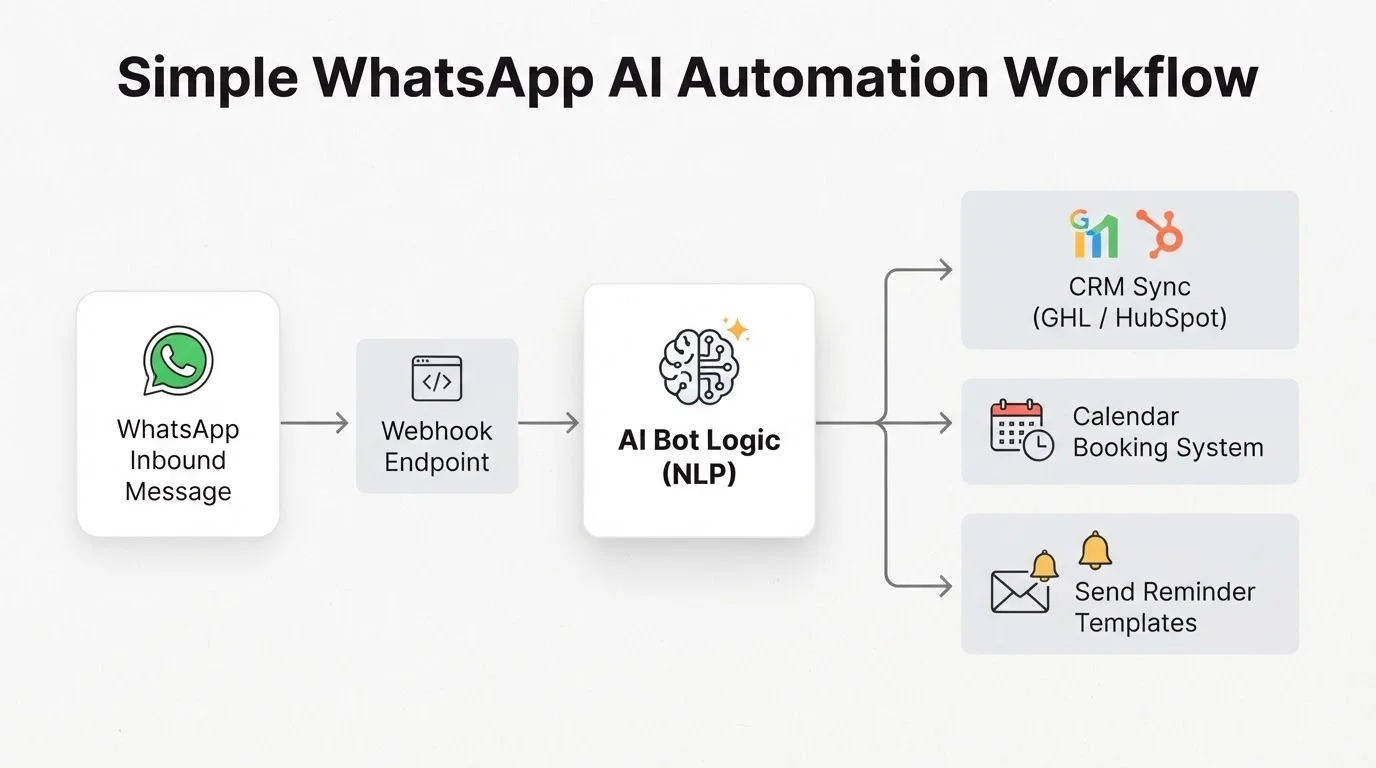
WhatsApp without CRM sync is a second inbox that managers cannot audit. Push inbound threads into GHL, HubSpot, or whatever your team already lives in. Create or update the contact, tag the source, and open a task when the bot escalates.
I often put n8n or Make between the webhook and the CRM so retries, logging, and "VIP alert" rules are not hardcoded in one brittle script.
3. Appointment and order reminders
No-shows kill local service businesses. A utility template with confirm / reschedule buttons is usually the highest ROI automation after basic Q&A. Same pattern for "your order shipped" and "quote expires Friday" if you have e-commerce or sales follow-up.
How API access actually works
Setup is bureaucratic, not mysterious. Rough sequence:
- Verify the business in Meta Business Manager (legal name, docs, matching details).
- Register a phone number for the API. It cannot stay logged into the consumer or Business app at the same time. Most shops keep the old number for a transition window and move customers over with a short notice.
- Get the display name approved so the brand customers see matches reality.
- Connect software: webhooks for inbound messages, your bot or workflow for replies, CRM for state.
- Submit message templates for anything you send outside the 24-hour customer service window.
Official start path: WhatsApp Cloud API Get Started. Timeline is often a few days to a couple of weeks for verification and templates, overlapping with the build.
If you go through a Business Solution Provider, you still want to own the number, templates, and conversation history. Switching partners should not mean starting from zero.
Compliance basics that keep the number alive
Meta enforces WhatsApp rules harder than most channels. Four that matter in practice:
Opt-in is required. Message people who agreed (form checkbox, checkout, QR, or they messaged you first). Purchased lists are a fast path to bans.
24-hour customer service window. After the customer's last message, you can reply freely (bot or human). When that window closes, only approved templates reopen the thread.
Templates are fixed formats with variables. Utility, marketing, and authentication are different categories with different scrutiny and pricing. Smuggle sales copy into a "utility" reminder and expect rejection. Write bilingual versions as separate approvals when you need them.
Quality rating is real. Blocks and reports lower your rating, then Meta throttles or suspends the number. Always offer a path to a human. Dead-end loops hurt customers and your score.
Local privacy rules still apply to transcripts: know where chats are stored, who can read them, and how you handle deletion requests. That is separate from Meta's messaging policy, and both matter.
If your plan starts with blasting cold contacts on WhatsApp, stop. Fix opt-in and the 24-hour window first, or you are funding a ban.
Optional voice when chat is not enough
Some leads never finish a booking in chat. A short voice agent (or a warm handoff to a human call) after WhatsApp qualification often recovers those. Same CRM contact, same consent trail, different channel for the last mile.
I treat voice as an add-on to a working WhatsApp + CRM loop, not a replacement for it. Text is cheaper and always on; voice is for high intent and sticky objections.
A sane rollout for a local business
Here is the sequence I push in discovery calls:
- Get API access moving early (Meta's clock is not yours).
- Ship a bot on your real top questions, with escalation.
- Connect calendar booking once answer quality is decent.
- Sync contacts and outcomes into GHL / HubSpot (or your CRM).
- Add reminder and status templates once opt-in and utility copy are clean.
- Layer voice only where chat drop-off is measurable.
From nothing to a live, compliant loop is often a few weeks when scope stays tight. Dashboards that matter: first-response time, resolution without a human, template read/reply rates, Meta quality rating, and bookings or qualified leads attributed to WhatsApp.
Useful references while you plan:
If you want help wiring WhatsApp, CRM, and optional voice without turning your number into a spam liability, book a free discovery call. Bring your top twenty chat questions and whatever CRM you already pay for. That is enough to sketch a real build path.