
Most image-to-3D demos still hand you a blob you cannot rig, retopo, or drop into Unreal without a cleanup pass.
Meshy T2 is aimed at that gap: native mesh generation with explicit connectivity, controllable face budgets, and a six second median image-to-mesh path. The technical report is on arXiv:2607.28675. Weights and code were promised on github.com/meshy-dev/meshy-t2.
If you build product configurators, game props, or ecommerce 3D previews, this is the kind of latency that changes iteration loops from overnight renders to "try again before the standup ends."
Why autoregressive mesh models stall
Mainstream native mesh generators serialize triangles into token sequences and decode autoregressively. That works in papers. It is painful in production:
- Inference is slow because every vertex waits on the last token.
- Errors compound down the sequence.
- Multi-part assets need separate generation plus stitching.
Meshy T2 walks away from that structure. It treats each vertex as one continuous latent token, generates the full vertex set in a parallel flow-matching pass, and decodes connectivity and face winding in the same step.
The coarse-to-fine pipeline
Generation is a two-stage cascade:
Reference image
      │
      ▼
Image-conditioned voxel flow  →  coarse occupancy scaffold
      │
      ▼
Mesh flow (vertex budget B)  →  per-vertex latents + connectivity
      │
      ▼
Mesh VAE decode  →  triangle mesh with parts
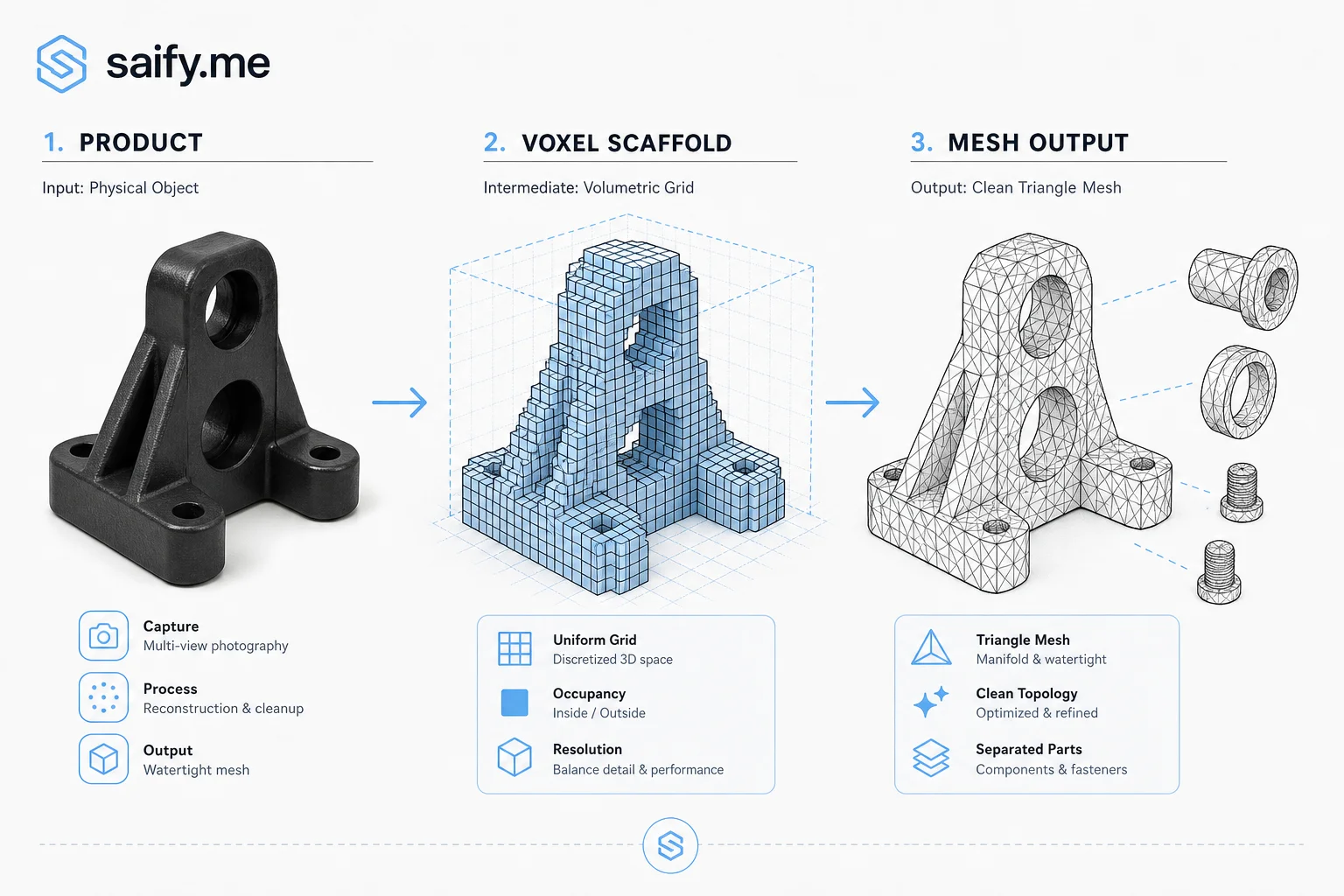
Stage 1: voxel scaffold. An image-conditioned flow sketches global shape as a coarse occupancy grid. Layout and silhouette land before detail spend.
Stage 2: mesh flow. Conditioned on the image, scaffold, and a requested vertex budget, a second flow populates latent tokens. You pick complexity up front. No decimate-after-the-fact hack.
Mesh VAE. Encodes one continuous latent per vertex. Decoding preserves artist-style topology without welding coincident vertices or quantizing positions into soup. Multi-part objects fall out as connected components in the generated graph, not as separate models glued in Blender.
What the numbers claim
From Meshy's launch materials and paper tables:
| Claim | Detail |
|---|---|
| Median latency | 6 seconds end-to-end image to mesh |
| Speed vs AR baselines | More than 10x faster than autoregressive mesh decoders in their eval |
| Perceptual alignment | Leads compared methods on FD with a DINOv2 backbone (semantic + structural match to input photo) |
| Success rate | 100% on their image-to-mesh eval set (vendor-reported; treat as directional) |
| Face budget control | User-specified vertex budget directly shapes output complexity |
Those are vendor benchmarks on their harness. Still useful as a signal that parallel flow matching is competitive with the slow token-by-token path the field has been stuck on.
Production path versus research artifact
Meshy T2 is the research framework behind the next generation of Meshy's consumer image-to-3D pipeline. Browser upload in, textured asset out. The T2 paper focuses on geometry and topology. Texturing and material passes may still sit in separate stages in product.
For teams evaluating feed-forward 3D, compare against:
| Approach | Strength | Weakness for game/film pipelines |
|---|---|---|
| COLMAP + photogrammetry | Metric scale, proven | Slow iteration, brittle on textureless regions |
| NeRF / Gaussian splats | Pretty previews | Not engine-ready meshes without heavy post |
| Autoregressive mesh LLMs | Native connectivity | Latency and error accumulation |
| Meshy T2 (flow mesh) | Fast explicit meshes, part decomposition | New; verify on your asset classes |
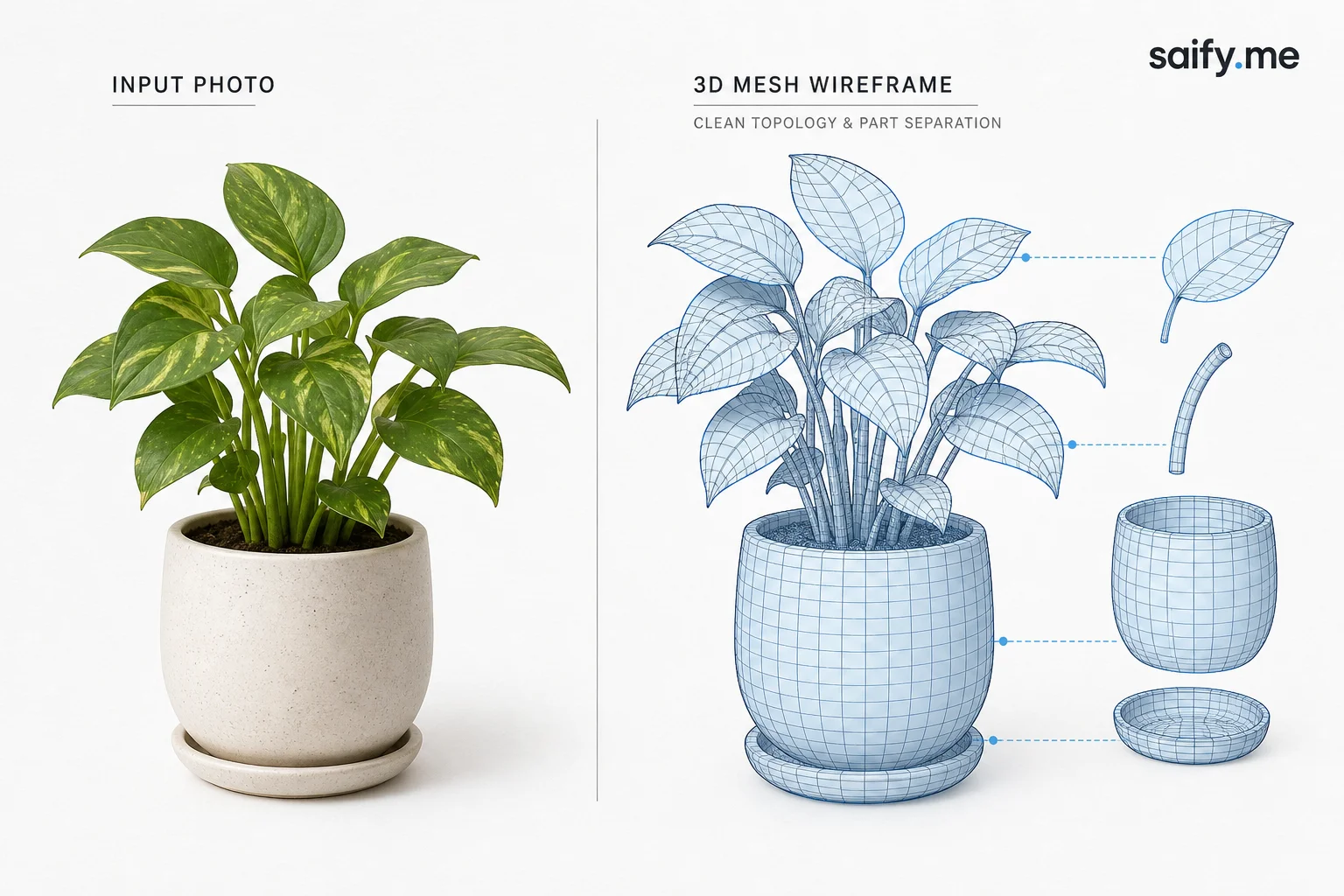
Hugging Face's launch post includes qualitative grids (plants, machinery, furniture) with readable wireframes. That is the bar: topology you would actually hand to an artist, not a melted iso-surface.
Where I would test first
- Ecommerce hero SKUs with one clean product photo and a hard polygon cap for mobile WebGL viewers.
- Rapid blocking for level designers who need placeholder props before art pass.
- AR try-on prototypes where mesh cleanliness matters more than photoreal materials on v1.
I would not bet a cinematic pipeline on day-one weights without an internal eval on your SKU photography (reflections, thin parts, transparency). Flow models can still hallucinate back faces. Six seconds is only valuable if the mesh survives rigging.
Limitations to plan for
- Vendor stage. Code and weights were "opening shortly" at publication. Confirm license and commercial terms before baking into a paid SKU flow.
- Single-view bias. One photo means occluded sides are inferred, not observed. Multi-view capture still wins for hard assets.
- Topology != materials. PBR texturing, LOD chains, and rigging remain downstream work.
- Benchmark scope. FD scores and 100% success are on their curated sets. Your barware, jewelry, or mechanical assemblies may behave differently.
Bottom line
Meshy T2 is a credible push on the "fast and usable mesh" problem. Parallel flow matching plus vertex-set VAE decoding is the technical bet. Six second median latency is the product bet.
If your team is still exporting NeRF previews and paying artists to retopo every AI draft, benchmark native mesh generators on editability, not just screenshot fidelity. The win is measured in minutes saved before the first human touch, not polygons on a leaderboard.
Building 3D or vision pipelines where latency and mesh quality gate a product launch? Book a free discovery call.