
A 12-billion-parameter image model used to mean a datacenter GPU or a cloud API tab you close before the invoice arrives.
Krea 2 , open-sourced June 23, 2026, is a diffusion transformer trained from scratch with a novel text-fusion stack. Not a Flux fork. Not a SDXL reskin. Krea claims aesthetic-first exploration as the design goal.
The headline for local builders: GGUF quants fit 12GB consumer GPUs, and Turbo generates in 8 steps with CFG disabled.
Raw versus Turbo (do not mix them up)
Krea ships two checkpoints:
| Checkpoint | Role | Inference |
|---|---|---|
| Krea 2 Raw | Fine-tune and post-training base | ~28 steps, CFG ~4.5 |
| Krea 2 Turbo | Production generation | 8 steps, guidance_scale=0 |
The vendor line is simple: train on Raw, run on Turbo.
Turbo is what you wire into ComfyUI for day-to-day posters, mood boards, and client concept art. Raw is what you touch when you are training LoRAs or experimenting with distillation.
Resolution support runs from about 1K to 2K, padded to multiples of 16.
export K2_CHECKPOINT=oss_turbo
python sample.py "soft paper editorial cover, minimal typography" \
  --steps 8 --cfg 0 --mu 1.15 --width 1280 --height 720
VRAM reality on 12GB cards
Community FP8 Turbo builds land around 12.01 GiB for the transformer alone. On a 12GB RTX 3060, that leaves no room for the Qwen3VL-4B text encoder, VAE, and sampling activations.
The workable path is GGUF through ComfyUI-GGUF (city96 fork or molbal's quant pack on Hugging Face):
| Quant (Turbo) | Approx size | Target GPU |
|---|---|---|
| Q4_K_M | ~8.3 GB | 12GB tight fit |
| Q5_K_M | ~8.9 GB | 12GB sweet spot |
| Q8_0 | ~13.6 GB | 16GB+ |
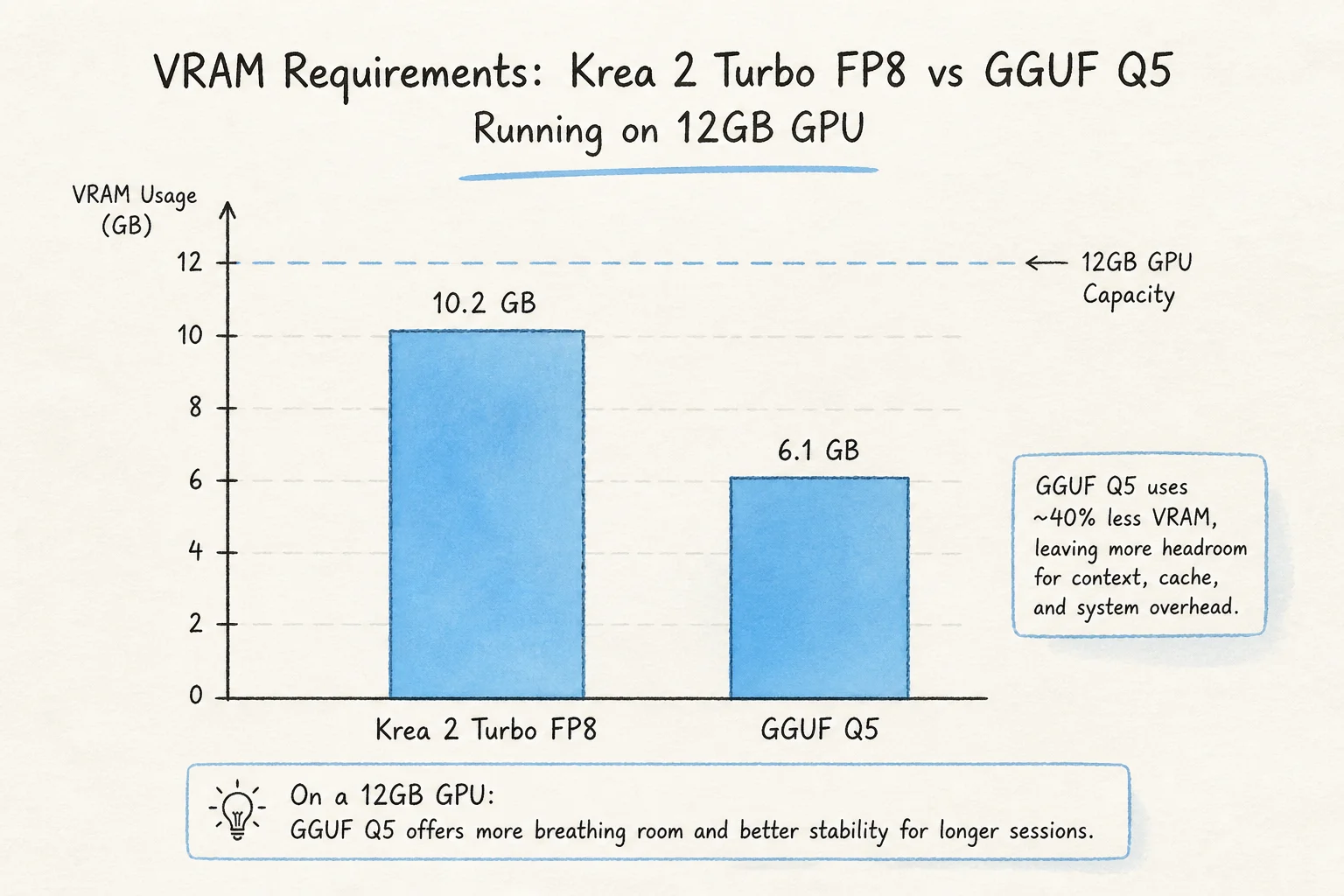
On 12GB, expect compromise: lower quants, smaller resolutions, or longer wall-clock time. The win is running locally at all, not matching datacenter throughput.
Apple Silicon paths exist through community MLX and llama.cpp experiments, but GPU CUDA + ComfyUI is the documented happy path today.
License and commercial guardrails
Krea 2 is not Apache 2.0. The Community License caps commercial revenue and seat counts. Read the terms on the repo before you ship a client-facing product or SaaS wrapper.
If your buyer needs "no legal review," compare against:
- FLUX.2 klein (Apache 2.0, smaller footprint)
- API-only routes (Midjourney, OpenAI image APIs) where license risk sits with the vendor
Krea 2 is for teams that want aesthetic range and accept license scrutiny.
When I would use Krea 2 in client work
Good fits:
- Mood boards and marketing explorations on locked-down machines
- Stylized creative direction where generic stock diffusion looks flat
- Prototyping image features before paying cloud inference at scale
- Fine-tuning artistic styles on Raw, deploying Turbo in a local ComfyUI lane
Weak fits:
- Photoreal product shots that must match brand color science exactly
- Sub-second interactive editors (8-step Turbo is fast, not instant on 12GB)
- Teams without ComfyUI appetite or GGUF maintenance
Pair Krea with your existing local stack posts: on-device agents for text, Krea for visuals, same air-gapped machine.
Setup sketch (ComfyUI + GGUF)
- Install ComfyUI 0.25+ and ComfyUI-GGUF custom nodes
- Download
krea2_turbo_bf16-Q5_K_M.gguffrom molbal/krea2-gguf - Load Turbo with
UnetLoaderGGUF, wire Krea 2 text encoder + VAE from official releases - Set 8 steps, CFG 0, resolution start at 1024² before pushing 1280×720
Log VRAM with nvidia-smi during first runs. If you OOM, drop to Q4_K_M or reduce resolution before you blame the model.
Bottom line
Krea 2 is not the easiest local image model. It is the one that says 12.9B aesthetic DT from scratch and then backs the consumer GPU story with quants that actually fit 12GB when you choose GGUF over FP8 hubris.
Train on Raw. Ship Turbo. Read the license. Benchmark on your GPU, not a vendor slide.
If you want help wiring local image gen into a lead site or private creative workflow, book a free discovery call.