
Cron jobs wake up dumb. They fire a script, exit, and forget what happened yesterday.
Agent sessions are the opposite: rich context, tool access, and memory of what already failed. The gap between "scheduled task" and "ongoing agent work" is where most production automations break.
Nous Research closed that gap in August 2026 with /loop for
Hermes Agent
: a slash command that re-runs a prompt on a timer inside your current session, with backoff, caps, and stop conditions that actually terminate the loop.
What /loop does
Syntax from the Hermes loops docs:
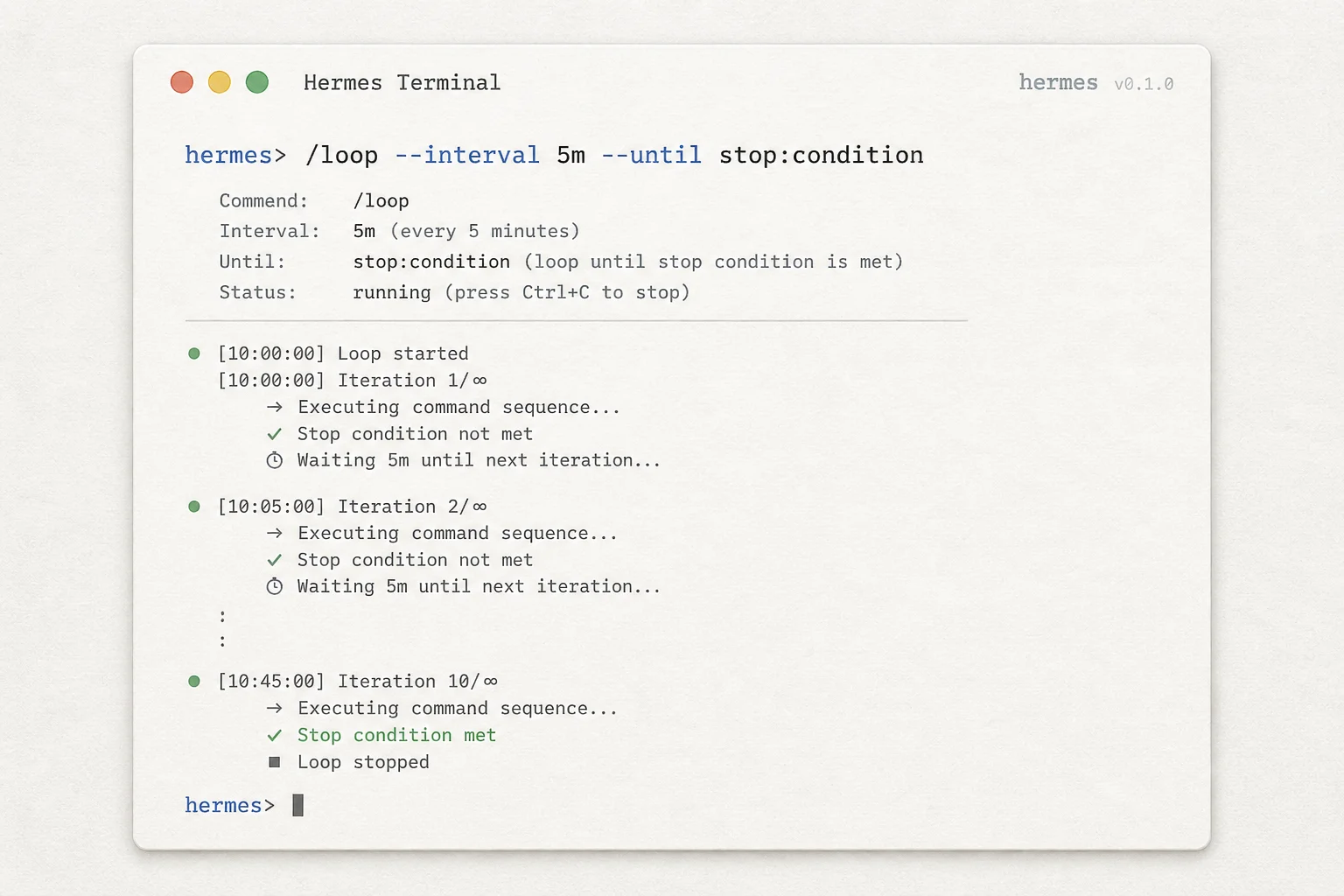
Recurring loops documentation/loop [interval] [--times N] [--until condition] <prompt or slash command>
Examples that map to real ops work:
| Pattern | Command sketch |
|---|---|
| Deploy watch | /loop 5m check CI status and ping me when the build flips green |
| Queue monitor | /loop 2m summarize queue depth; stop if depth < 10 for 3 checks |
| Iterate until green | /loop run tests, fix failures, repeat until passing |
| Self-paced polling | /loop check the staging health endpoint (no interval: agent backs off when nothing changes) |
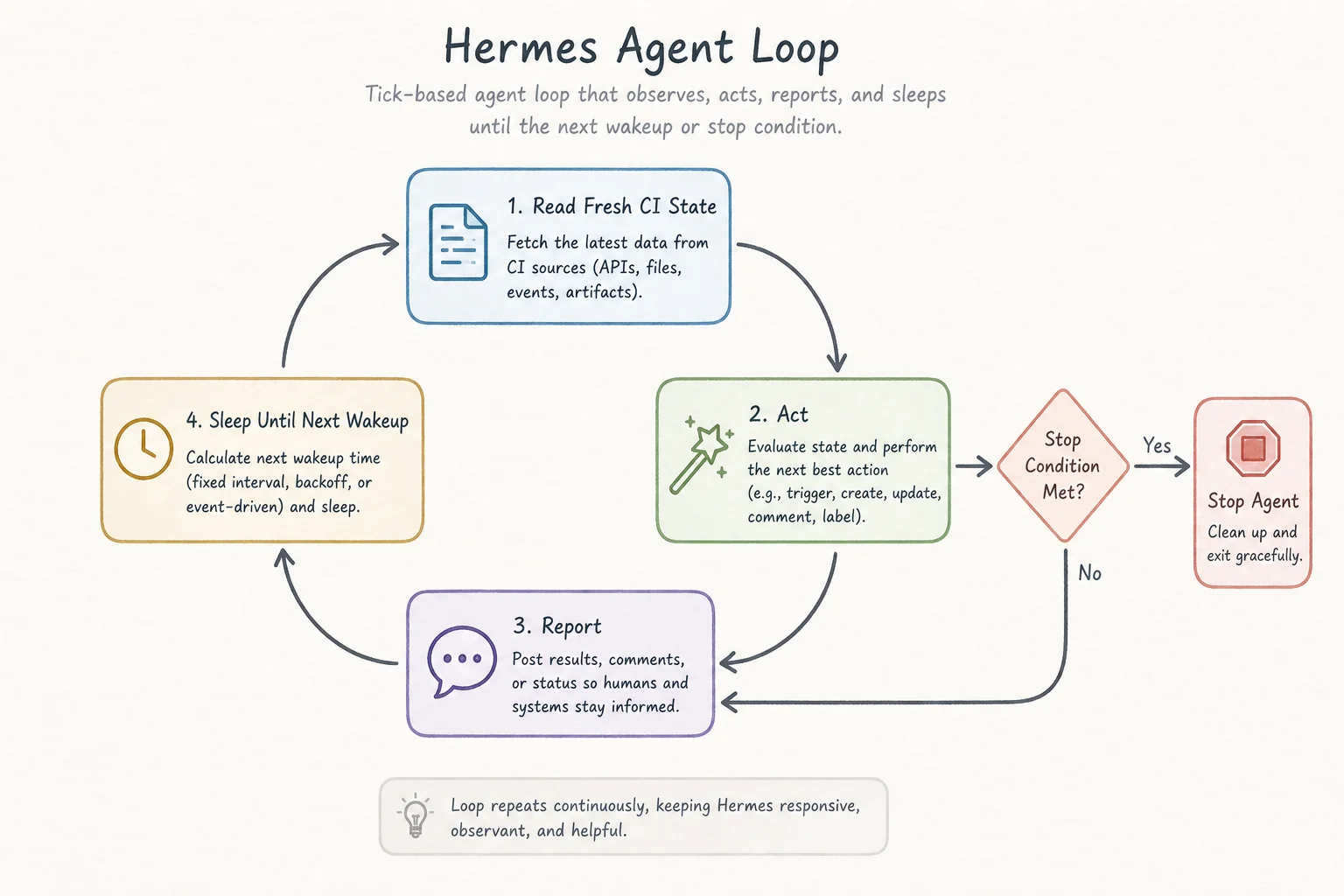
Each tick is a full agent turn. Hermes re-reads live state (CI JSON, log tail, file on disk), acts, reports, then sleeps until the next wakeup.
That is different from blasting the same static prompt every five minutes. The loop inherits session memory, prior tool outputs, and your corrections from earlier ticks.
Stop conditions that prevent runaway bills
The feature ships with guardrails operators actually need:
--times Nhard-caps tick count.--until "natural language condition"ends when a judge model agrees the goal is met.- Agent-emitted
LOOP_COMPLETEtoken in the reply (demoed in community walkthroughs). - Self-pacing backoff when outputs stop changing (checks often at first, slows toward ~15 minutes).
/loop pause,/loop resume,/loop stopwithout losing the session.
OpenClawDatabase documented a local demo against Qwen 3.8 27B: a fake deploy status file stepped queued → building → deploying → live, and the loop closed itself when the stage read live and the reply ended with loop complete. No human touched the terminal after the initial command.
/loop vs /goal vs cron
Hermes already had scheduling primitives. /loop fills a specific slot:
| Feature | Trigger | Lives in | Best for |
|---|---|---|---|
/loop | Timer or self-paced | Current session | Polling, monitoring, periodic re-runs with context |
/goal | Judge after each turn | Current session | One objective, iterate until achieved |
cron / cronjob tool | Wall-clock schedule | Separate session per run | Unattended jobs that survive restarts |
Use cron when nobody is watching. Use /loop when you are actively pair-programming with the agent on a long job and want periodic wakeups without spawning a fresh session each time.
The docs also expose /proactive as a Claude Code parity alias for /loop.
Where I would use this in client work
Three patterns I would pilot next quarter:
- Release windows. Loop on deployment health checks while the human reviews unrelated PRs in the same Hermes session.
- Data pipeline babysitting. Poll object store row counts until a batch job crosses a threshold, then trigger downstream transforms with full context of earlier failures.
- Flaky test triage. Re-run a failing suite on a backoff schedule until green or until
--timesfires and escalates to a human.
The win is not "no cron jobs harmed" as a meme. It is stateful monitoring without giving up agent tools between checks.
Limits to respect
/loop is session-bound. Close the laptop, lose the loop unless you also have a cron job or gateway process holding the session open.
Minimum intervals still apply (community demos cite ~30 second floors). This is not a high-frequency trading trigger.
And /loop does not replace idempotent infrastructure. If the agent can send a Slack message every tick, cap ticks and add --until conditions before you aim it at #incidents.
Try it
Hermes Agent documentationInstall Hermes, start a session in CLI or a connected Telegram/Discord gateway, and run:
/loop 5m check GitHub Actions for the main branch deploy workflow. Report only when status changes.
Watch /loop status for next wakeup time. When the job is done, /loop stop.
Need agent workflows that survive longer than a single prompt? Book a free discovery call and we can wire monitoring loops with real stop conditions.