
Your agent just received a .docx, a .pptx, and a legacy .xls from a client upload folder. The RAG chunker expects Markdown. Spinning up LibreOffice headless for each file adds seconds of latency and a fragile subprocess layer.
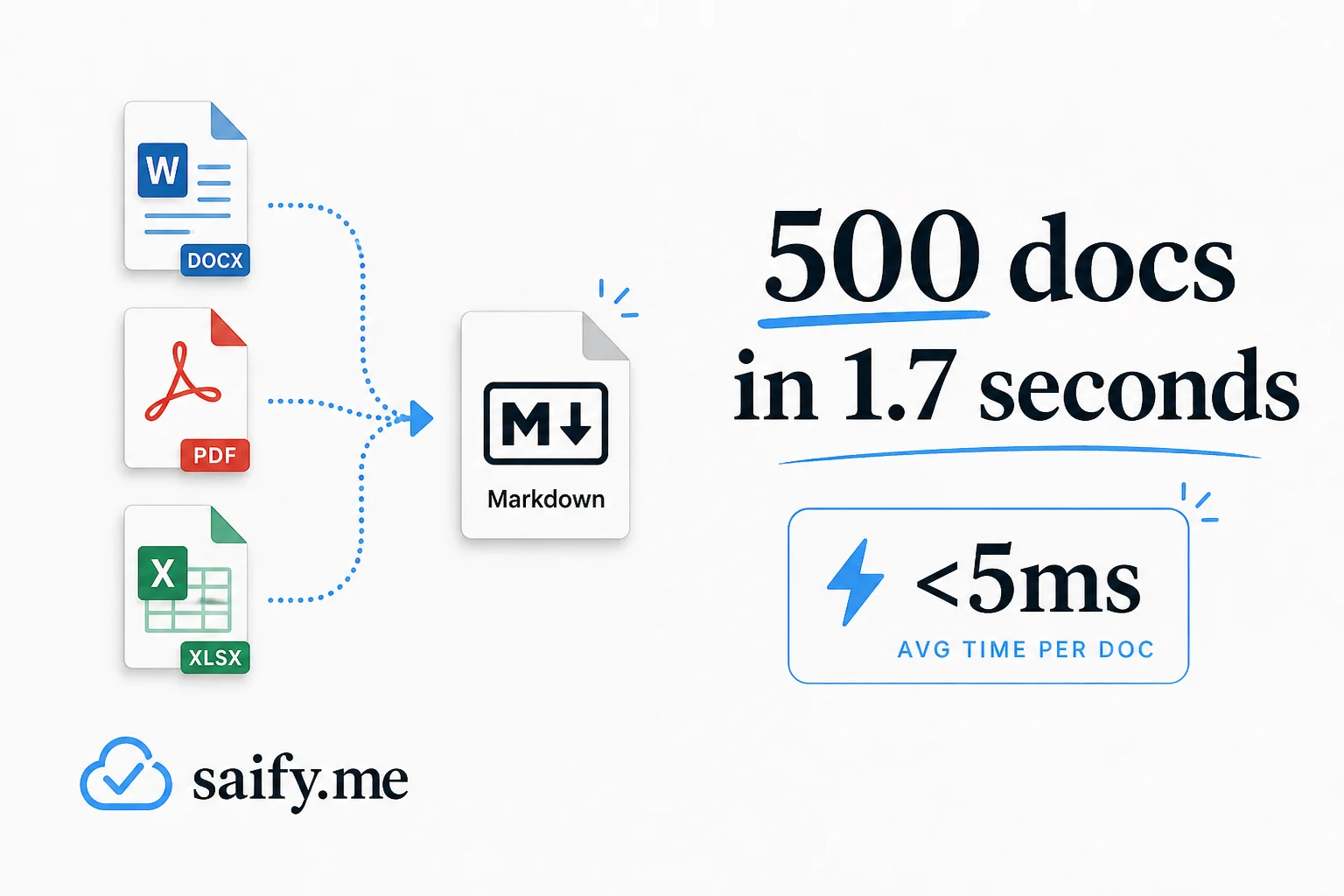
Firecrawl anydoc is a different bet: pure Rust, no ML, MIT license, and a median 4.4ms per document on Firecrawl's published benchmark. One digest I read claimed 500 Word docs in 1.7 seconds. Whether you hit that exact number depends on hardware and batch warmth, but the order of magnitude is the point. Document ingestion stops being a bottleneck and starts behaving like a library call.
What anydoc actually does
anydoc reads document bytes, detects the format from content markers (not just the file extension), parses into a shared document model, and renders GitHub-Flavored Markdown through one serializer.
That single output path matters for agents. Headings, tables, footnotes, task lists, and math blocks behave the same whether the source was a .doc from 2003 or a .pptx from last week. You do not maintain fourteen different post-processors.
Firecrawl built it to power Firecrawl Parse, their hosted document API. Self-host the library when you want the same conversion inside your VPC, a CI job, or a local agent skill with zero network round trips.
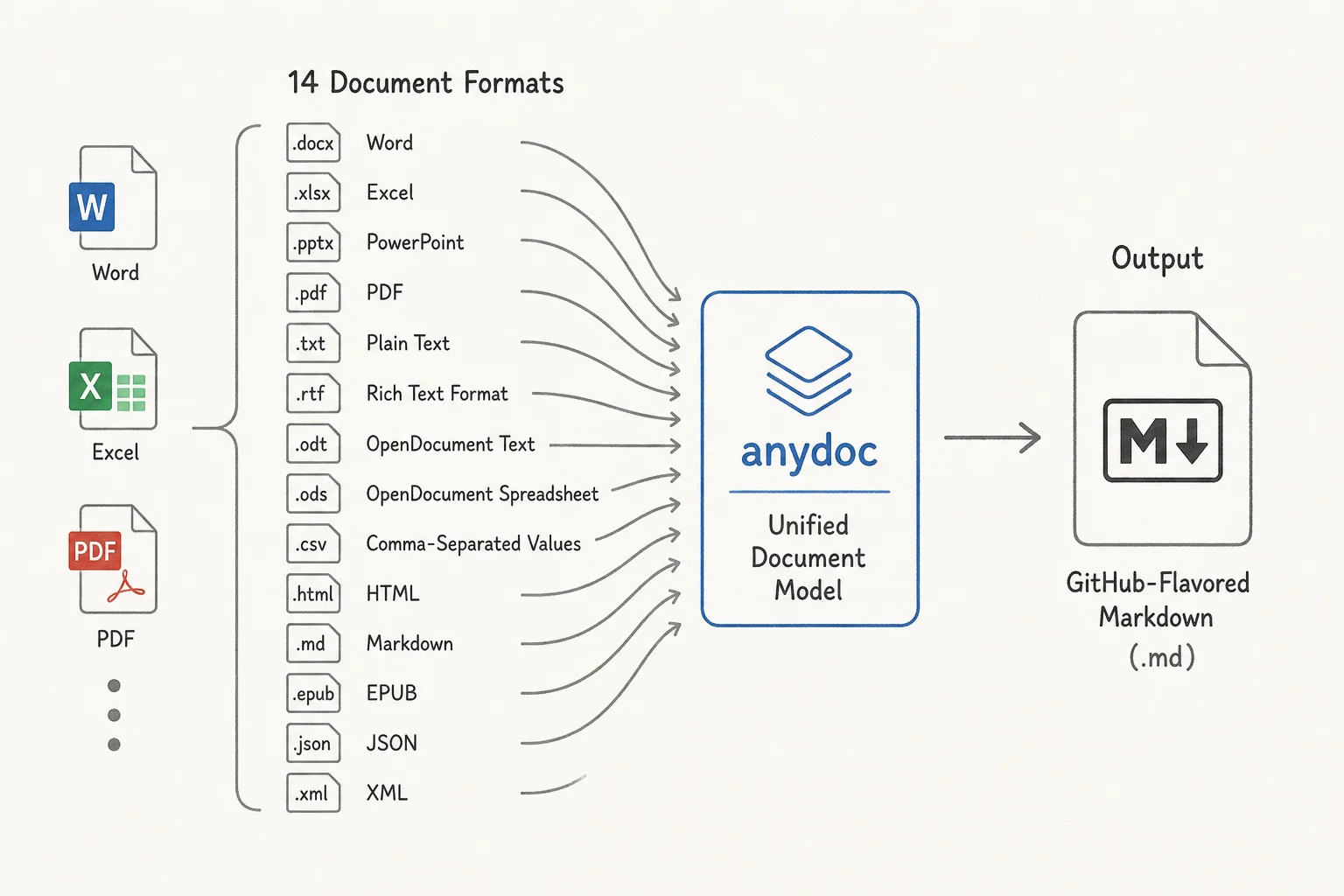
Fourteen formats, one Markdown dialect
| Format family | Extensions | Notes |
|---|---|---|
| Word | .doc, .docx, .docm | Legacy OLE and modern OOXML |
| PowerPoint | .ppt, .pps, .pot, .pptx, .pptm, .ppsx, .ppsm | Speaker notes preserved |
| Excel | .xls, .xlsx, .xlsm, .xlsb | Tables with merged cells |
| OpenDocument | .odt, .ods, .odp | LibreOffice-native packages |
| Rich Text | .rtf | Equations to LaTeX |
| EPUB | .epub | MathML to GFM math |
| CSV | .csv | Needs extension or explicit format hint |
.pdf | Text-based only via pdf-inspector |
Content-based detection reads PDF headers, RTF open groups, OLE stream names, and ZIP package mimetypes. Mislabeled files still convert when the bytes match a known signature. CSV has no magic bytes, so name it explicitly when you pass raw bytes.
Structure the library preserves includes headings with anchors, bold and italic, strikethrough, inline and fenced code, links and internal cross-references, nested and task lists with source numbering, tables with header rows and merged cells, block quotes, footnotes, endnotes, and speaker notes. Equations from Word OMML, PowerPoint OMML, OpenDocument MathML, and RTF convert to $...$ inline and $$ block math. Embedded images surface as alt text in Markdown while raw bytes stay on the document model for downstream asset handling.
How it fits agent pipelines
Most document-to-LLM stacks look like this today:
upload → guess format → subprocess or cloud API → messy HTML or plain text → cleanup regex → chunk → embed
anydoc collapses the middle:
upload → anydoc::to_markdown → chunk → embed
For coding agents, Firecrawl ships an Agent Skill you install with one command:
npx skills add firecrawl/anydoc
After that, Claude Code, Cursor, Codex, or any skills-compatible agent can convert attachments before summarization or code generation. The skill teaches the CLI path so the agent does not guess flags.
CLI usage is equally direct:
npx @firecrawl/anydoc report.docx
npx @firecrawl/anydoc slides.pptx -o slides.md
npx @firecrawl/anydoc - --format csv < data.csv
npx pulls a prebuilt binary on first run. Install globally with npm install -g @firecrawl/anydoc if you want a permanent anydoc on PATH.
Bindings that stay out of the way
| Surface | Install | Typical call |
|---|---|---|
| Rust | cargo add anydoc | anydoc::to_markdown("report.docx")? |
| Node.js | npm install @firecrawl/anydoc | await toMarkdown('report.docx') |
| Python | pip install firecrawl-anydoc | anydoc.to_markdown("report.docx") |
| Browser WASM | npm install @firecrawl/anydoc-wasm | toMarkdownBytes(bytes) after init() |
| CLI | npx @firecrawl/anydoc | stdout Markdown or -o file.md |
Node runs conversion on the libuv thread pool so the event loop stays responsive. Python releases the GIL during native work. WASM powers the browser demo where files never leave the machine.
Rust example for bytes with explicit format when needed:
use anydoc::{self, Format};

let markdown = anydoc::to_markdown("report.docx")?;
let from_bytes = anydoc::to_markdown_bytes(&bytes, None)?;
let from_csv = anydoc::to_markdown_bytes(&bytes, Format::Csv)?;
let document = anydoc::to_document(&bytes, None)?;
Stopping at to_document is useful when you need embedded asset bytes tagged by media type, not just the Markdown string.
anydoc vs MarkItDown vs LibreOffice (brief)
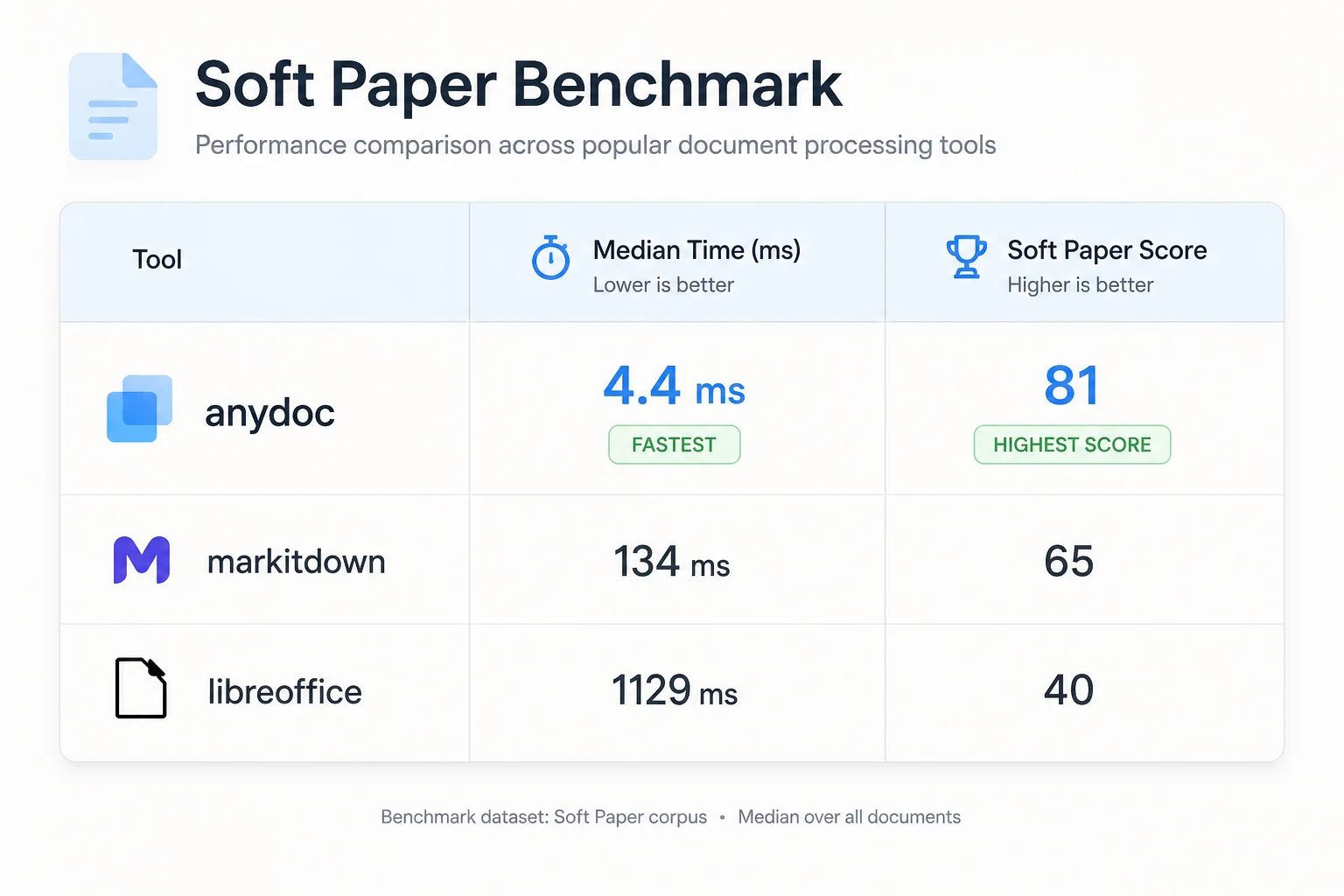
Firecrawl published a head-to-head benchmark on 100 real-world documents. An LLM judge (Claude Sonnet) scored blind outputs against ground-truth page renders. Speed is median milliseconds per warm conversion on a Ryzen 9 9950X3D.
| Tool | Formats covered | Median ms | Overall score |
|---|---|---|---|
| anydoc | 14/14 | 4.4 | 81 |
| LibreOffice | 12/14 | 1129.5 | 40 |
| MarkItDown | 6/14 | 134.8 | 65 |
| unstructured | 8/14 | 572.9 | 63 |
| pandoc | 5/14 | 102.1 | 56 |
MarkItDown (
Microsoft MarkItDown
) is the tool many Python teams reach for first. It covers six of the fourteen formats in this comparison, scores reasonably on those, and runs at roughly 135ms median. Fine for occasional .docx in a notebook. Less fine when your ingestion queue mixes .ppt, .xlsb, and .odp every hour.
LibreOffice headless still appears in production pipelines because it converts almost anything if you wait long enough. Median 1129.5ms and a 40 quality score in this harness tell you why ops teams complain. Subprocess management, font dependencies, and zombie soffice processes are real costs the spreadsheet row does not capture.
anydoc's pitch is narrower and sharper: all fourteen formats, highest per-format scores in the published table, and two orders of magnitude faster than LibreOffice on median latency. No ML means predictable CPU use and no GPU queue.
Errors you should plan for
anydoc returns Err only when no meaningful Markdown can be extracted. Variants map cleanly across Rust, Node, Python, and WASM:
| Error | Meaning | Agent handling |
|---|---|---|
Encrypted | Password-protected file | Ask user for decrypted copy |
Unsupported | Unknown format or image-only PDF | Route to OCR or reject |
Malformed | Structurally unusable | Log and skip |
ResourceLimit | Safety cap on decompression or nesting | Split or quarantine file |
MissingPart | Required package part absent | Treat as corrupt upload |
Pattern for batch ingestion in Rust:
match anydoc::to_markdown(path) {
    Ok(markdown) => Some(markdown),
    Err(error @ (anydoc::ConvertError::Encrypted | anydoc::ConvertError::Unsupported(_))) => {
        unconverted.push((path, error));
        None
    }
    Err(error) => return Err(error),
}
Encrypted and unsupported files get recorded; unexpected I/O failures abort the batch.
Where anydoc is not enough
Scanned PDFs with no text layer still need OCR. anydoc handles text-based PDFs locally through
pdf-inspector.
Image-only pages return Unsupported. If your mailbox receives fax scans daily, pair anydoc with an OCR stage or use hosted Firecrawl Parse for the full stack.
Schema-constrained field extraction is also out of scope. anydoc gives you clean Markdown for chunking and summarization, not typed JSON against your invoice schema. For that layer, tools like structured extraction models or schema-decoding pipelines still belong downstream.
Practical wiring for Applied AI shipping
When I evaluate document ingestion for a client RAG or agent project, anydoc checks four boxes that matter in production:
-
Latency at scale. Sub-10ms median per file means ingestion keeps up with webhook bursts. The 500 docs in 1.7s figure is the kind of throughput that makes same-minute indexing realistic on a single core.
-
Format breadth without forked code paths. One serializer means your chunker and metadata extractors see consistent heading levels and table syntax across the whole office suite.
-
Deploy anywhere. Rust crate for services, Python for notebooks, WASM for browser-side privacy, CLI for agent skills. MIT license removes procurement friction.
-
No hidden ML bill. CPU-only conversion makes cost predictable on Workers, Lambda, or a bare VM. You pay for compute you can measure.
My default pattern: anydoc at the edge of the pipeline for native office files, OCR only for scanned PDFs, then your existing chunker and embedder. Keep LibreOffice as a fallback only if you still have exotic legacy macros that must render visually (rare in agent workflows).
Try it before you commit
- Browse the WASM demo locally: firecrawl.github.io/anydoc
- Read the benchmark harness in the repo under
bench/ - Install the agent skill and drop a
.docxinto your next Cursor session
Document parsing used to be the slow, subprocess-heavy step agents worked around. anydoc treats it like parsing JSON: fast, deterministic, and boring in the best way.
If you are wiring mixed-format ingestion into an agent or RAG pipeline and want a second pair of eyes on chunk boundaries and failure handling, book a free discovery call.